Patient calls and privacy
What happens to a patient’s call: what they hear, what Terva keeps, where it’s stored and who can see it. This is the plain version. Our privacy policy is the full one.
Common questionsCallers hear that Terva is an AI
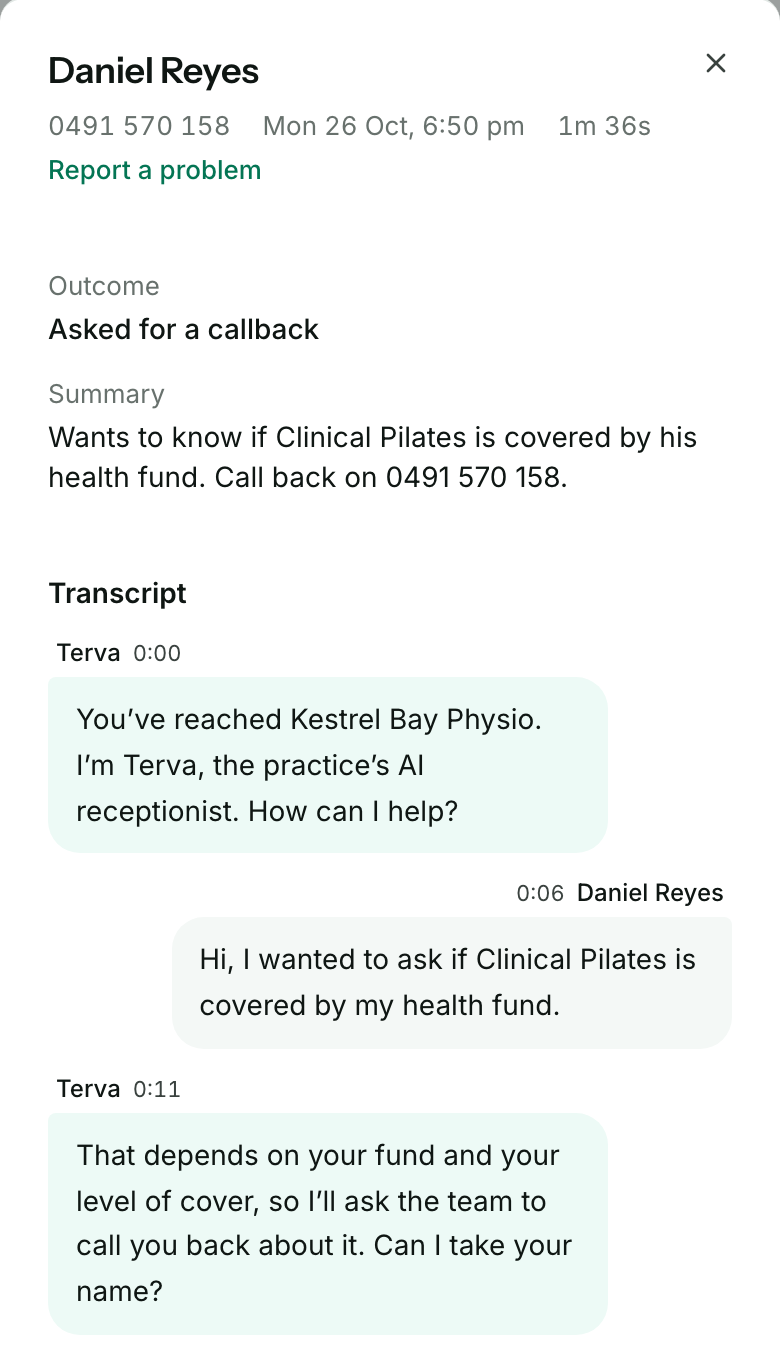
Every call starts with Terva saying who it is, with your practice’s name: “You’ve reached Kestrel Bay Physio. I’m Terva, the practice’s AI receptionist. How can I help?”
If a caller asks whether they’re talking to a person, Terva says it’s an AI receptionist. A caller who’d rather talk to your team can ask for a call back.
Terva keeps a transcript, not a recording
Terva doesn’t record calls, so there’s no audio to play back. It keeps a written transcript, a short summary, and the request it took: the caller’s name, number and what they need.
Open a call in Calls to see its Summary and Transcript.
Emails leave out what was said
Emails to your team have the patient’s name, number and the kind of request, like Urgent clinical review. They don’t include what the patient said: that stays in Terva, behind your sign-in.
Emails go only to your practice’s callback address. Read more in The Queue and your team’s emails.
Where call records are kept
Calls, transcripts and requests are stored in Sydney. Some of the services that handle a live call run overseas, including in the United States.
We keep call records for as long as your practice needs them, and you can ask us to delete them at any time. The privacy policy has the detail.
Who can see a call
Anyone who signs in to your practice’s dashboard can see your Queue and Calls. Only the practice owner can change what Terva tells patients.
Terva’s support team can also open your account.

In short
- A call in Calls has a Summary and a Transcript, and no audio.
- Emails to your team show who called and what kind of request it is, not what they said.
- Each call starts with Terva saying it’s your practice’s AI receptionist.
Common questions
- A patient asks how their information is handled
- Your practice’s own privacy policy covers how you handle patient information. Terva’s is at terva.ai/privacy.
- A patient doesn’t want to talk to an AI
- They can ask Terva for a call back from your team. It lands in your Queue.
- You want a call’s record deleted
- Email will@terva.ai with the call’s date and time. Leave out any health details.
- Someone can see your dashboard who shouldn’t
- Email will@terva.ai straight away, and we’ll remove their access.
Still have a question?
Book a set-up call and we’ll go through it with you.